



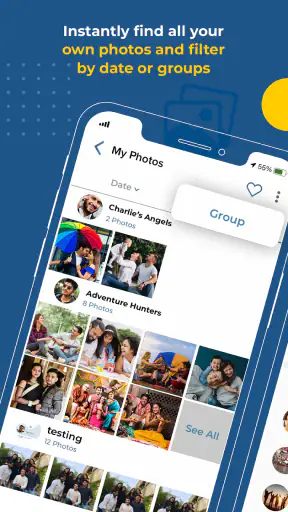
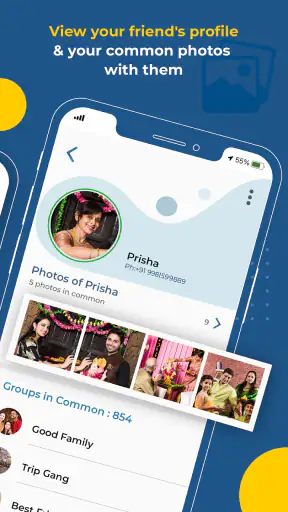
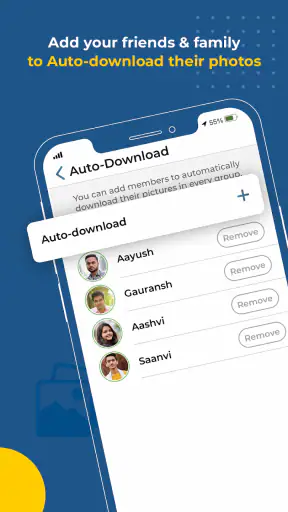
I tried Kwikpic - Smart Photo Sharing as an event-focused app, and its basic idea is easy to understand: make it simpler for people at the same occasion to share photos with one another. That focus matters because event pictures often end up scattered across private messages, cloud folders, and social feeds. Kwikpic aims to give that moment its own place instead of asking every guest to manage a separate sharing routine.
It is a free app from Kwikpic Ai Solutions Private Limited, listed for Teen users and available on Android devices running version 5.0 or later. The app has reached over one million installs and holds an average rating of 3.7 from around 3.2 thousand ratings. Those figures suggest a product with a meaningful audience, while also hinting that the experience may not be equally smooth for everyone.
How clearly the app works from the first screen
My first impression is that the event-based purpose is more approachable than a general-purpose photo service. Instead of beginning with a broad collection of unrelated tools, the concept points toward a specific task: joining an occasion, sharing pictures, and finding images connected to that occasion later. For a wedding, birthday, school gathering, or family trip, that narrower purpose can reduce the mental effort involved in deciding where photos belong.
The most important test for an app like this is not whether it can display attractive images. It is whether a person who has just arrived at an event can understand what to do without needing a long explanation. Kwikpic makes the most sense when the organizer introduces it before guests start taking pictures. A short spoken instruction, a visible event name, and a clear invitation process can make the difference between a lively shared collection and a group of confused participants.
I would not treat it as a replacement for every photo tool. A traditional messaging app is often faster when I only need to send two pictures to one person. A cloud storage service is usually better when I want carefully arranged folders, long-term file management, or broad control over sharing. Kwikpic is more interesting in the middle ground: a temporary or occasion-centered space where many people can contribute without turning the main conversation into an endless stream of attachments.
That distinction is useful when deciding whether to recommend it. If the group already has a familiar chat and only a few people will contribute, introducing another app may create more friction than it removes. If an event has many guests taking photos from different viewpoints, a dedicated collection can be much easier to browse than a busy chat timeline.
Readable organization matters more than decoration
For users who are easily overwhelmed by dense screens, the app’s value depends on whether event information, photo actions, and personal account steps remain visually distinct. I found that the event concept gives the interface a natural organizing principle, but users should still avoid creating unnecessary complexity around one occasion. A clear event title and a simple sharing routine are more helpful than asking guests to navigate several parallel spaces.
One practical tip is to decide in advance who will explain the process. This is especially useful at family events where some guests are comfortable with new apps and others are not. The person helping should demonstrate the action slowly, then let each guest complete it independently. That approach is kinder than taking someone’s phone and doing everything for them, because it leaves them more confident when they want to view or share another photo later.
The current version is 15.8, and the app has been available since July 26, 2022. I mention that context because an established app can still feel different across devices and user groups. A person using a newer phone may have a smoother experience than someone relying on an older handset, particularly when an event produces a large number of images.
Motor and sensory needs during a busy event
Photo sharing is often done in imperfect conditions: one hand may be holding a plate, a child, or another camera; the screen may be reflecting sunlight; and background noise may make spoken instructions difficult to follow. That means ease of use is not only about the app’s normal layout. It is also about how forgiving the workflow feels when attention and movement are limited.
For someone with reduced dexterity, the best approach is to prepare before the event rather than trying to learn the app while moving between conversations. Joining the relevant space early, checking the account flow, and practicing one upload can reduce the number of precise taps required at the busiest moment. I would also keep the phone in a stable position and use the device’s own text-size and display settings where needed.
People with low vision may benefit from increasing system text size or display contrast, but those adjustments can change how much information fits on screen. Enlarged text may make an action easier to read while also requiring more scrolling. That is a normal trade-off worth testing before an important occasion. I would not assume that a device setting automatically makes every part of the app equally comfortable.
For users who are sensitive to visual clutter, a shared photo space can be calmer than a rapidly moving chat, because the images belong to one recognizable event. However, a large collection can still become difficult to scan. A helpful habit is to review photos in short sessions rather than trying to process everything at once. If the event is especially busy, I would ask the organizer to explain where the main collection is located and avoid sending repeated instructions through several channels.
Users who are hard of hearing may prefer written instructions from the organizer rather than relying on an announcement. A concise message explaining the event name and the expected action is more inclusive than assuming everyone heard the same spoken explanation. Kwikpic can support that kind of workflow as long as the group treats written guidance as part of the event plan, not as an afterthought.
Where the app fits in real situations
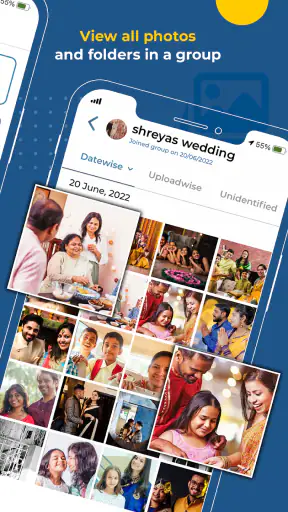
Imagine a family celebration where several relatives take pictures from different tables. One person captures the speeches, another photographs older family members, and a teenager records informal moments between the formal shots. In a normal chat, those images may arrive mixed with logistics, reactions, and unrelated messages. A dedicated event collection gives the group a better chance of finding the pictures later without searching through a conversation.
I think that is one of the strongest everyday use cases. The app is not merely about sending a picture quickly; it is about giving a group a shared memory space. That makes it particularly useful when guests do not all know one another well or when the organizer wants contributions from people who would not normally exchange contact details directly.
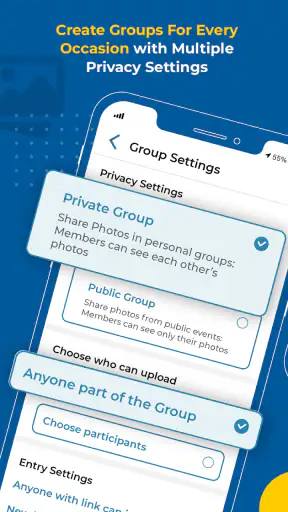
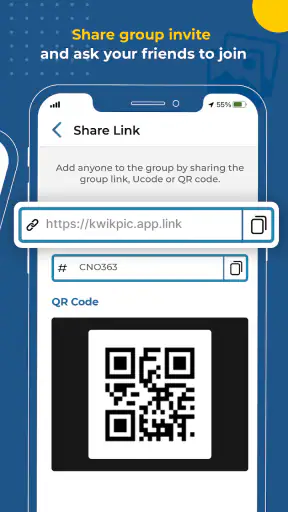
It could also suit a school or community occasion where several people document the same activity. The organizer should still consider who is allowed to participate and how the event is explained to younger users, since the content rating is Teen. I would avoid assuming that every attendee should automatically be included. A clear invitation process is better for privacy, comfort, and general coordination.
For travel, the app may be useful when a group wants to gather pictures from the same day without appointing one person as the official photographer. The trade-off is that a shared collection can contain duplicates, blurry shots, or images that only make sense to the person who took them. I recommend agreeing on a simple habit: upload the best version of a moment, and keep particularly personal pictures for direct sharing instead.
At a professional event, I would be more selective. Kwikpic may help collect informal images from a team gathering, but it should not automatically be treated as a complete media-management system. If the event requires formal approval, detailed ownership rules, or structured archiving, a specialized business workflow may be a better fit.
What can make access harder
The main barrier is the need to persuade a group to adopt another app. Even when the core idea is simple, every extra installation, sign-in step, or explanation can exclude someone who has limited storage, an older device, unreliable connectivity, or little patience for unfamiliar software. This is why I would never make participation depend on Kwikpic alone unless every guest has had a chance to prepare.
There is also a social barrier. Some people enjoy contributing photos, while others prefer not to appear in shared collections or do not want their camera roll involved in an event workflow. An inclusive organizer should offer an alternative rather than treating non-participation as uncooperative. A normal direct message or a later transfer can remain available for guests who prefer it.
Large photo collections may create practical strain as well. More images mean more time spent browsing and more chances for the important picture to get buried. I would use the app for gathering first, then do a small amount of organization afterward. Asking everyone to curate perfectly during the event is unrealistic, especially for users who already find rapid digital tasks tiring.
Another limitation is that the app’s usefulness depends heavily on event coordination. If no one explains the purpose, people may not know whether they should upload immediately, wait until later, or share only selected images. The product can provide the space, but the organizer still has to establish the social rules. That is not a flaw unique to Kwikpic, but it is an important part of the real experience.
Compared with a familiar messaging app, Kwikpic may feel slower at the very beginning because the group must enter a shared context. Compared with a cloud album, it may feel more focused on the occasion and less suited to permanent personal organization. Compared with social media, it offers a more contained setting for a group that does not want to publish event photos publicly. Choosing it therefore depends less on the camera itself and more on how the group intends to collect and revisit memories.
Who I would recommend it to
I would recommend Kwikpic to families, friend groups, and event organizers who want many people to contribute photos without flooding a regular conversation. It is especially appealing when the event has a clear identity and the group values seeing different perspectives rather than receiving only the official photographer’s selection.
I would also suggest it to users who want a straightforward occasion-based alternative to public posting. The app’s free price removes one obvious obstacle to trying it, although the real cost is the time needed to bring participants into the same workflow. Before an important event, I would test the process with two or three people, prepare a written explanation, and decide how to handle guests who do not want to participate.
I would skip it when the goal is a private one-to-one transfer, a carefully managed professional archive, or a long-term replacement for a personal photo library. In those situations, a direct messaging service or established cloud storage may be more efficient. I would also hesitate if the guest list includes many people who cannot or do not want to install an additional app.
My inclusive verdict after using it
Kwikpic has a clear and useful place in the events category: it turns group photo sharing into an activity centered on one occasion instead of one conversation. I like that idea because it addresses a real problem, particularly when many people capture the same day from different angles. Its strength is not advanced editing or elaborate photo management; it is the shared context.
From an accessibility perspective, I see the best results when the app is supported by thoughtful event planning. Written instructions, early preparation, sensible expectations about uploads, and an alternative for non-participants make the experience more welcoming. System display settings can help some users, but they should be tested beforehand rather than assumed to solve every readability issue.
The average rating of 3.7 shows that the experience is not universally effortless, and my own recommendation reflects that nuance. I would happily suggest it for a group that genuinely needs a common event collection, but I would not impose it on guests who already have barriers with new apps or shared digital spaces. Its real advantage appears when coordination is the problem; when simplicity for one sender is the priority, a familiar alternative may win.
Overall, I see Kwikpic as a practical free tool for gathering memories from a shared occasion, provided the organizer treats inclusion as part of the setup. It is worth trying before a wedding, reunion, trip, or community event, not during the most hectic moment. With a clear plan and realistic expectations, it can make scattered group photos easier to find and enjoy.


